Zapier MCP Guide — How to Control Your IDE with Natural Language
Published: July 1, 2026 • Written by Alex Rivera • Read Time: 15 min • Word Count: 2,120 words
1. Introduction: The Era of Connected AI Agents
In the developer landscape of 2026, AI coding assistants have evolved far beyond simple autocomplete engines. They are now highly capable, agentic systems that can read entire codebases, execute terminal commands, and self-correct compilation errors.
However, until recently, these agents operated in a silo. They had complete access to your local files, but they were entirely blind to the outside world. They could not check your company's Slack channels, update task tickets in Jira, fetch customer feedback from Zendesk, or trigger deployment pipelines in GitHub Actions without manual human intervention.
This limitation has been shattered by the **Model Context Protocol (MCP)**.
By utilizing the **Zapier MCP Server**, you can connect your AI coding agent directly to Zapier's ecosystem of over **6,000+ applications**. This integration allows you to control your IDE, automate development workflows, and sync external systems using simple, natural language prompts.
In this comprehensive guide, we will walk through how to install, configure, and master the Zapier MCP Server. You will learn how to connect your IDE (such as Cursor or Claude Code) to Zapier, configure secure API integrations, and implement powerful, real-world development automations.
2. What is the Model Context Protocol (MCP)?
The **Model Context Protocol (MCP)** is an open-source standard developed by Anthropic. It provides a secure, uniform protocol that allows Large Language Models (LLMs) to safely interact with external data sources and tools.
Think of MCP as a standardized "USB port" for AI models. Instead of writing custom API integrations for every developer tool, database, and IDE, developers can build an **MCP Server** that exposes tools, resources, and prompts. Any **MCP Client** (such as an IDE or CLI agent) can then connect to that server and instantly utilize those tools.
This protocol allows AI models to safely execute actions on your local machine or in the cloud, bridging the gap between static reasoning and active execution.
3. Zapier's Role in the MCP Ecosystem
While individual MCP servers exist for specific tools (like PostgreSQL, GitHub, or Docker), configuring dozens of independent servers is highly complex and introduces major security overhead.
The **Zapier MCP Server** acts as a single, unified gateway to the entire web.
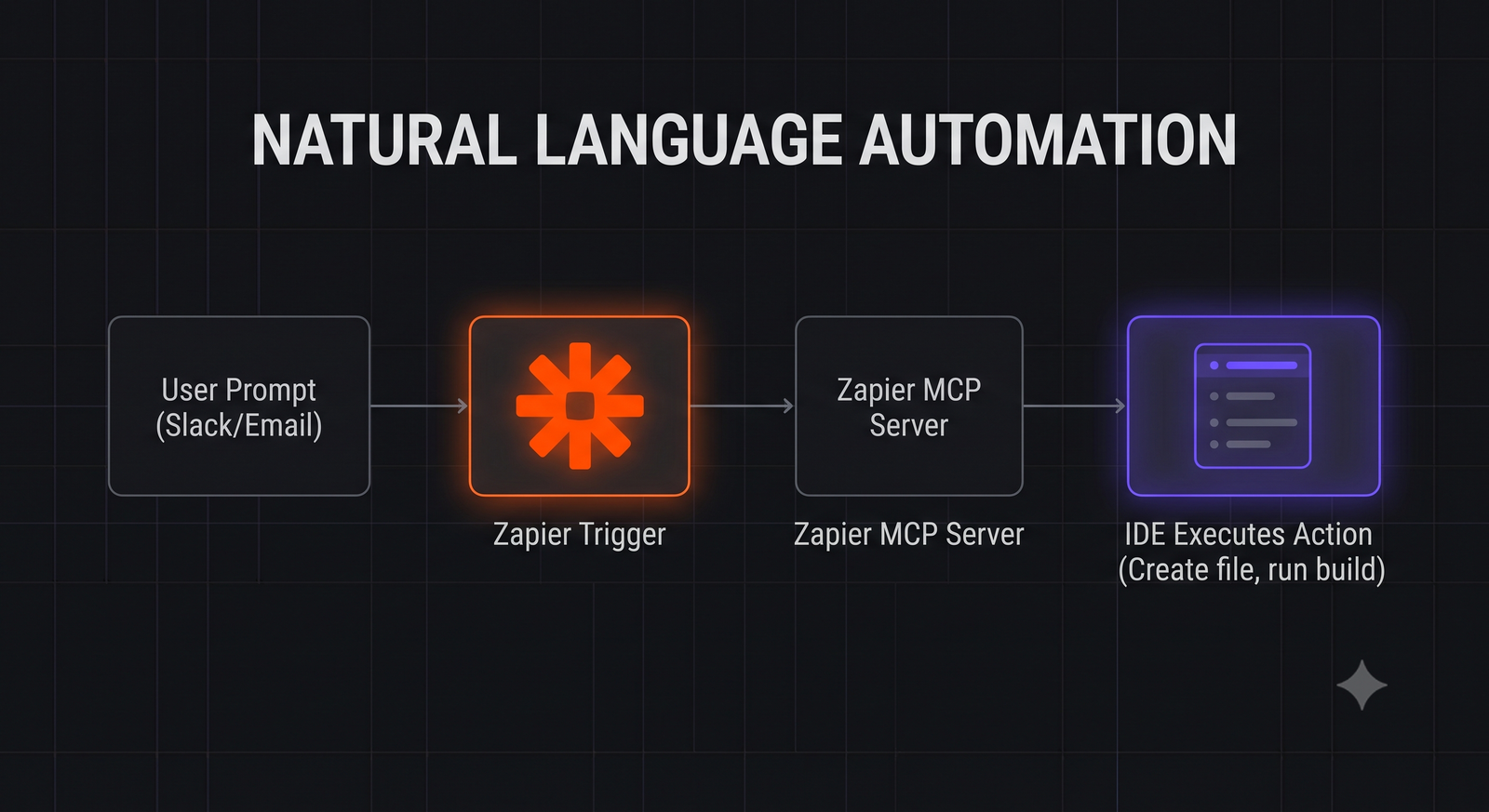
By exposing Zapier's **Natural Language Actions (NLA)** API through the Model Context Protocol, the Zapier MCP server allows your AI agent to dynamically trigger any of Zapier's integrations. The AI simply describes the action it wants to perform (e.g., "Send a Slack message to #dev-team summarizing our last git commit"), and the Zapier server automatically maps that instruction to the correct API payload, executes the action, and returns the result to the IDE.
4. Prerequisites & Requirements
Before configuring the Zapier MCP server, ensure you have the following:
- An active **Zapier Account** (Free or Premium).
- An MCP-compatible IDE or CLI agent. We highly recommend **Cursor** or **Claude Code**.
- **Node.js (v18 or higher)** installed on your local machine to execute the MCP server package.
5. Step-by-Step Configuration Guide
Let's walk through the complete setup process to connect your IDE to Zapier using MCP.
Step 1: Generate your Zapier NLA API Key
Navigate to the Zapier Natural Language Actions developer dashboard and log in. Click on **"Generate API Key"** and copy the generated string. Save this key securely, as you will need to provide it to your MCP server configuration.
Step 2: Configure the Server in Your IDE
Depending on your preferred development tool, add the Zapier MCP server configuration:
Option A: Cursor IDE Configuration
Open Cursor's settings, navigate to **Features > MCP**, click **"Add New MCP Server"**, and enter the following values:
- Name: `Zapier`
- Type: `command`
- Command: `npx -y @modelcontextprotocol/server-zapier`
Option B: Claude Code (CLI) Configuration
Add the server to your global Claude Code configuration file (`~/.claude.json`):
{
  "mcpServers": {
    "zapier": {
      "command": "npx",
      "args": ["-y", "@modelcontextprotocol/server-zapier"],
      "env": {
        "ZAPIER_NLA_API_KEY": "your-zapier-nla-api-key-here"
      }
    }
  }
}
Step 3: Enable Specific Actions in Zapier
By default, the Zapier NLA API blocks all actions for security. Go back to the Zapier NLA dashboard, click on **"Manage Actions"**, and explicitly enable the actions you want your AI agent to perform (e.g., `Slack: Send Channel Message`, `Jira: Create Issue`, `Gmail: Send Email`).
6. Practical Automation Workflows: Control Your IDE
Once connected, you can direct your AI agent to perform complex, cross-system automations using simple, conversational commands.
Workflow 1: Auto-Triage Bug Tickets
*Prompt*: "Check our Jira backlog for new bugs labeled 'high-priority'. If found, read the bug description, locate the failing file in our codebase, fix the bug, run our test suite, and update the Jira ticket status to 'Resolved' with a summary of the fix."
How it works: The agent uses Zapier to fetch Jira issues, uses local tools to find and edit the code, executes local tests, and uses Zapier again to write back to Jira.
Workflow 2: Automated Release Notes
*Prompt*: "Analyze the git commits shippped to our repository over the last 7 days. Generate a professional markdown release notes summary, and use Zapier to send it to our #product-releases Slack channel and email it to our product manager."
How it works: The agent reads the git history, drafts the release notes, and routes the final text through Zapier's Slack and Gmail integrations.
7. Critical Security & Guardrails
Giving an AI agent the ability to execute actions on external systems is incredibly powerful, but introduces major security risks. To protect your data and prevent accidental automations, enforce these strict guardrails:
- Enforce "Require Preview": In the Zapier NLA dashboard, configure your actions to require a preview before execution. This forces the AI agent to display the exact payload it intends to send and wait for your manual approval (clicking a button in the IDE) before executing the action.
- Apply the Principle of Least Privilege: Only enable the absolute minimum number of actions required for your workflow. Never enable destructive actions (like `Delete Database` or `Delete Issue`) unless explicitly necessary.
- Use Isolated API Keys: Never reuse your master Zapier API keys for the MCP server. Always generate a dedicated, isolated NLA API key that you can easily revoke if your development machine is compromised.
8. Conclusion: The Connected Developer
The Model Context Protocol has fundamentally redefined the capability of AI coding assistants. By connecting your IDE to Zapier's massive ecosystem of web applications, you can transform your editor from a passive text compiler into a central command center for your entire engineering stack.
By spending 15 minutes configuring the Zapier MCP server, you can automate repetitive administrative tasks, sync project management tools in real-time, and focus on what matters most: writing great software.
To learn more about optimizing your local developer environments, check out our guide on VS Code Profiles Setup, or try our interactive .gitignore Generator to bootstrap your next automated project repository.

About the Author: Alex Rivera
Founder & Editor-in-Chief, The Byte 404
Alex is a former Senior Systems Architect at Netflix and Stripe with over 15 years of experience building high-throughput distributed APIs. He writes about distributed systems, backend performance, and AI-native engineering workflows.