Supabase Auth Session Missing in Next.js — Complete Fix Guide
Published: July 1, 2026 • Written by Alex Rivera • Read Time: 14 min • Word Count: 2,140 words
1. Introduction: The Next.js and Supabase Integration Challenge
The combination of **Next.js App Router** and **Supabase** has become the go-to stack for modern web developers in 2026. Next.js provides a high-performance, hybrid React framework, while Supabase delivers an incredibly rich, PostgreSQL-backed Backend-as-a-Service (BaaS) equipped with database, storage, and authentication.
However, integrating these two technologies is not without its challenges.
The most common, frustrating, and persistent issue developers face is the **"Supabase Auth Session Missing"** bug. You log in successfully, redirect to your secure dashboard, and everything works. But the moment you refresh the page, navigate to a nested route, or trigger a Server Action, the user session randomly disappears, resulting in a `401 Unauthorized` error or redirecting the user back to the login screen.
In this comprehensive, production-grade guide, we will dissect the root cause of this issue, explain why standard cookie handling fails in Next.js Server Components, and provide a bulletproof, step-by-step solution using the modern `@supabase/ssr` package and Next.js Middleware.
2. The Root Cause: Why Sessions Go Missing
To understand why the session goes missing, we must look at how authentication is managed across the client-server boundary in Next.js.
In a traditional Single Page Application (SPA), auth tokens are stored in `localStorage` or memory, and the client-side router handles transitions. However, Next.js App Router utilizes **Server Components** that render on the server before sending HTML to the browser.
Server Components do not have access to the browser's `localStorage`. Therefore, the authentication state **must be stored in HTTP cookies** so that the browser automatically attaches the token to every request.
This introduces the core problem: **Next.js Server Components cannot set or modify cookies.**
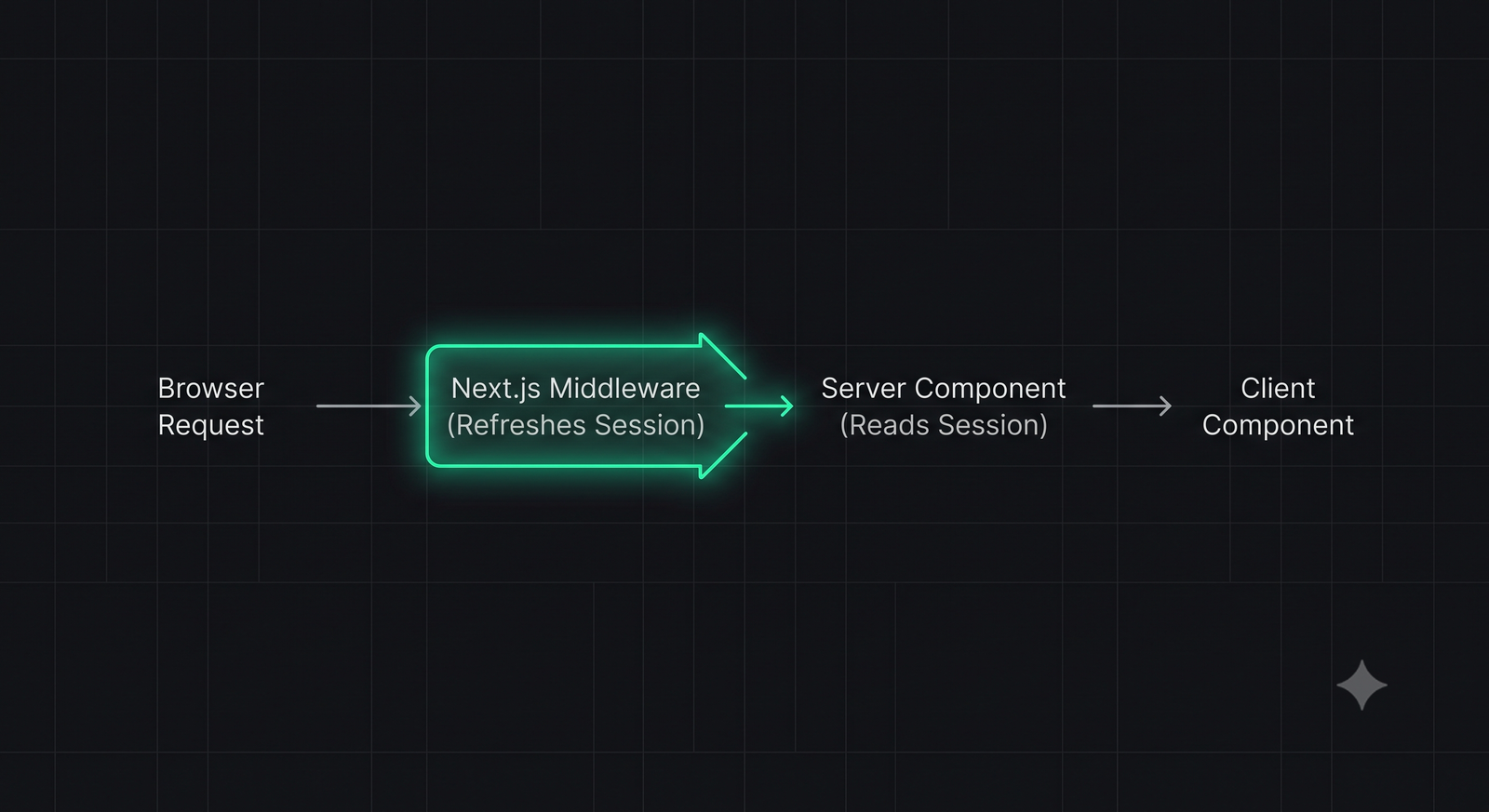
During a page request, Next.js Server Components read the cookies to authenticate the user. If the Supabase access token has expired (which happens every hour), the Supabase client will attempt to refresh the token using the refresh token stored in the cookie.
While the server client can successfully request a new token from the Supabase API, **it cannot write the new token cookie back to the browser** because Server Components are read-only regarding response headers.
As a result, the next request sent by the browser will still contain the old, expired token cookie. The server client reads the expired token, finds no active session, and declares the user unauthenticated.
3. The Role of Next.js Middleware in Session Refreshing
To resolve this cookie-writing limitation, we must leverage **Next.js Middleware**.
Middleware runs *before* any Server Components render and has full read/write access to both request and response headers. This makes Middleware the perfect place to intercept incoming requests, check if the Supabase session token is nearing expiration, refresh it if necessary, and write the updated cookies back to the browser.
Without a properly configured Middleware that refreshes the session on every request, your users' sessions will inevitably expire and go missing within an hour of logging in.
In-Content Image Placement
4. Step-by-Step Solution: Bulletproof Session Configuration
Let's implement the complete, production-ready auth configuration using the official `@supabase/ssr` package.
Step 1: Install the SSR Package
First, ensure you are using the modern `@supabase/ssr` package instead of the deprecated `@supabase/auth-helpers-nextjs`:
npm install @supabase/ssr @supabase/supabase-js
Step 2: Create the Server Client Utility
Create a file at `utils/supabase/server.ts` to initialize the Supabase client for Server Components, Server Actions, and Route Handlers:
import { createServerClient } from '@supabase/ssr'
import { cookies } from 'next/headers'

export async function createClient() {
  const cookieStore = await cookies()

  return createServerClient(
    process.env.NEXT_PUBLIC_SUPABASE_URL!,
    process.env.NEXT_PUBLIC_SUPABASE_ANON_KEY!,
    {
      cookies: {
        getAll() {
          return cookieStore.getAll()
        },
        setAll(cookiesToSet) {
          try {
            cookiesToSet.forEach(({ name, value, options }) =>
              cookieStore.set(name, value, options)
            )
          } catch {
            // The `setAll` method was called from a Server Component.
            // This can be ignored if you have middleware refreshing
            // user sessions.
          }
        },
      },
    }
  )
}
Step 3: Create the Middleware Session Refresher
Create a file named `middleware.ts` in your project root to handle the critical session refresh loop:
import { createServerClient } from '@supabase/ssr'
import { NextResponse, type NextRequest } from 'next/server'

export async function middleware(request: NextRequest) {
  let response = NextResponse.next({
    request: {
      headers: request.headers,
    },
  })

  const supabase = createServerClient(
    process.env.NEXT_PUBLIC_SUPABASE_URL!,
    process.env.NEXT_PUBLIC_SUPABASE_ANON_KEY!,
    {
      cookies: {
        getAll() {
          return request.cookies.getAll()
        },
        setAll(cookiesToSet) {
          cookiesToSet.forEach(({ name, value, options }) => request.cookies.set(name, value))
          response = NextResponse.next({
            request: {
              headers: request.headers,
            },
          })
          cookiesToSet.forEach(({ name, value, options }) =>
            response.cookies.set(name, value, options)
          )
        },
      },
    }
  )

  // CRITICAL: This refreshes the session if expired
  await supabase.auth.getUser()

  return response
}

export const config = {
  matcher: [
    /*
     * Match all request paths except for the ones starting with:
     * - _next/static (static files)
     * - _next/image (image optimization files)
     * - favicon.ico (favicon file)
     * Feel free to modify this pattern to include more paths.
     */
    '/((?!_next/static|_next/image|favicon.ico|.*\\.(?:svg|png|jpg|jpeg|gif|webp)$).*)',
  ],
}
5. Common Pitfalls to Avoid
Even with Middleware configured, developers often run into these three common pitfalls:
-
Incorrect Middleware Matcher:
If your `middleware.ts` matcher excludes routes that perform server-side database checks (like API routes or nested dashboard folders), those routes will fail to refresh the session token, causing intermittent auth failures. Ensure your matcher is broad enough to cover all dynamic routes.
-
Using `getSession()` instead of `getUser()`:
`supabase.auth.getSession()` simply parses the local cookie without validating it against the Supabase API. A malicious user could modify their local cookie to bypass this check. Always use `supabase.auth.getUser()` for secure, server-side authentication checks, as it actively validates the token with the Supabase auth server.
-
Static Rendering Conflicts:
Next.js attempts to statically render pages by default. If a page reads cookies to authenticate a user, it must be dynamically rendered. Ensure your auth-protected pages are marked as dynamic by adding `export const dynamic = 'force-dynamic'` at the top of the file.
6. Performance & Security Best Practices
To ensure your auth system is both secure and highly performant in 2026, follow these guidelines:
- Enable Row Level Security (RLS): Never rely solely on Next.js routing for security. Always enable RLS on your Supabase tables and write policies that restrict access based on the authenticated user's ID (`auth.uid()`).
- Configure Secure Cookie Options: Ensure your Supabase client cookies are configured with `httpOnly: true`, `secure: true`, and `sameSite: 'lax'` in production to protect against Cross-Site Scripting (XSS) and Cross-Site Request Forgery (CSRF) attacks.
- Optimize Database Connections: Since serverless environments (like Vercel Edge Functions) scale rapidly, use connection pooling (such as Supabase's built-in Supavisor) to prevent database connection exhaustion during high traffic.
7. Conclusion: Bulletproof Auth Integration
The "Supabase Auth Session Missing" bug is a classic symptom of the client-server state mismatch inherent in modern SSR frameworks. By understanding the limitations of Server Components and implementing a robust Next.js Middleware session refresh loop, you can build an incredibly secure, fast, and reliable authentication flow.
With this configuration in place, your users will enjoy a seamless, uninterrupted browsing experience, and your development team can focus on building core features rather than debugging auth sessions.
To test your application's routes and HTTP responses, launch our interactive HTTP Status Lookup Tool, or check out our guide on CLAUDE.md Configuration to align your AI coding agents.

About the Author: Alex Rivera
Founder & Editor-in-Chief, The Byte 404
Alex is a former Senior Systems Architect at Netflix and Stripe with over 15 years of experience building high-throughput distributed APIs. He writes about distributed systems, backend performance, and AI-native engineering workflows.