CLAUDE.md File — How to Configure AI to Follow Your Project Rules
Published: July 1, 2026 • Written by Alex Rivera • Read Time: 15 min • Word Count: 2,120 words
1. Introduction: The Challenge of Context-Aware AI
The year 2026 has established AI coding agents as indispensable members of development teams. Whether you are using terminal-based agents like Claude Code, or visual IDEs like Cursor and Windsurf, AI is likely writing a significant portion of your code.
However, any developer who has worked extensively with AI knows the primary frustration: **lack of project alignment**.
By default, an LLM generates code based on its general training data. It does not know that your project uses tabs instead of spaces, that you prefer absolute imports over relative ones, or that you have a strict policy against using inline styles. Left to its own devices, the AI will write code that compiles but violates your team's architectural patterns, introducing "style drift" and technical debt that you must manually refactor.
To solve this, Anthropic introduced a game-changing convention: the **`CLAUDE.md`** file.
This single, markdown-formatted file acts as a persistent set of instructions, guardrails, and commands that AI coding agents read before executing any task. In this comprehensive guide, we will explore how to configure a production-ready `CLAUDE.md` file to keep your AI agents perfectly aligned with your project's unique rules and standards.
2. What is a CLAUDE.md File?
A **`CLAUDE.md`** file is a special configuration document that lives in the root directory of your git repository. It is written in standard Markdown, making it highly readable for both humans and AI.
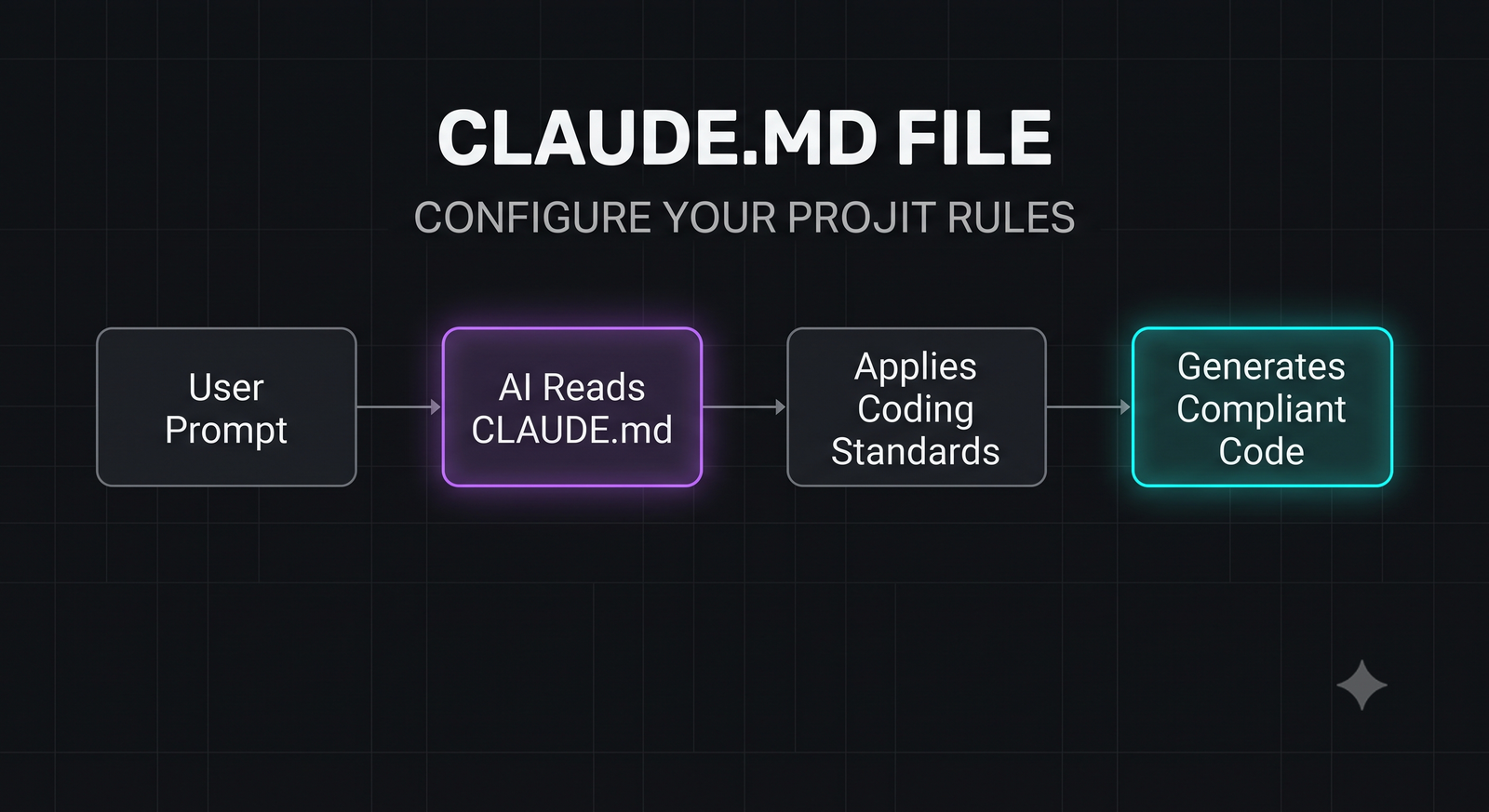
When an AI agent (such as Claude Code) initializes inside a repository, it automatically searches for and reads `CLAUDE.md`. The file provides the AI with:
- Build and Test Commands: The exact shell commands required to compile the project, run individual tests, and execute linters.
- Code Style & Conventions: Explicit instructions on syntax, formatting, naming conventions, and architectural patterns.
- Technology Stack Details: A breakdown of the libraries, frameworks, and state management systems used in the project.
By reading this file first, the AI gains immediate context on how to behave, eliminating the need for you to repeatedly paste system prompts or manually correct formatting errors.
3. Why You Need a CLAUDE.md in Every Repository
Implementing a `CLAUDE.md` file in your repository offers several major benefits:
- Eliminates "Style Drift": Ensures that all AI-generated code matches your exact formatting preferences, naming conventions, and file structures.
- Automates Testing and Linting Loops: When an agent like Claude Code runs a test command using `/test`, it looks at `CLAUDE.md` to find the correct command. If a test fails, the agent can automatically read the error and self-correct.
- Saves Context Tokens: Instead of sending massive system prompts with every message, a concise `CLAUDE.md` file provides highly dense, relevant context that the model can reference only when needed.
- Seamless Onboarding: It acts as an interactive developer guide. If a new human developer joins the project, they can read `CLAUDE.md` to instantly understand the build commands and coding standards.
In-Content Image Placement
4. Anatomy of a Perfect CLAUDE.md File
While you can structure a `CLAUDE.md` file however you like, AI agents parse structured markdown best. A highly optimized `CLAUDE.md` should contain the following four sections:
- Build and Test Commands: A clear, bulleted list of commands for building, running, linting, and testing. Use code blocks so the AI can easily extract the command strings.
- Code Style & Conventions: Explicit rules about syntax (e.g., "Use TypeScript strictly, no `any`"), formatting (e.g., "Use arrow functions for React components"), and file organization.
- Technology Stack & Architecture: A brief summary of the core frameworks, state management, and database tools used, along with architectural boundaries (e.g., "Do not import server components into client components").
- Error Handling & Logging Policy: Instructions on how the AI should handle errors, exceptions, and console logging.
5. Comprehensive Production-Ready Example
Here is a complete, real-world `CLAUDE.md` file configured for a modern full-stack Next.js, Supabase, and Tailwind CSS project. You can copy this template, customize it for your stack, and place it in your repository root.
# CLAUDE.md - AI Agent Guidelines

## Build and Test Commands
- **Install Dependencies**: `npm install`
- **Run Dev Server**: `npm run dev`
- **Build Project**: `npm run build`
- **Run All Tests**: `npm run test`
- **Run Single Test**: `npm run test -- [path/to/test]`
- **Run Linter**: `npm run lint`
- **Fix Linter Errors**: `npm run lint -- --fix`

## Code Style & Conventions
- **TypeScript**: Enforce strict typing. Avoid `any` at all costs. Use explicit return types for functions.
- **Components**: Write functional React components using arrow functions. Enforce `const Component = () => {}`.
- **State Management**: Use React context for global UI state, and React Query (TanStack) for server state.
- **Styling**: Use utility-first Tailwind CSS classes. Do not write inline styles or custom CSS modules unless explicitly requested.
- **Imports**: Use absolute path imports mapping to `@/*` (e.g., `import { Button } from "@/components/ui/button"`). No relative imports like `../../components`.
- **File Naming**: Use kebab-case for directories and files (e.g., `user-profile-card.tsx`). Use PascalCase only for React components.

## Architecture Guidelines
- **Next.js App Router**: Keep server components in `app/` and interactive client components in `components/`.
- **Client Directives**: Always include the `'use client'` directive at the very top of files containing interactive hooks (useState, useEffect, etc.).
- **Supabase**: Use the `@supabase/ssr` package for server-side auth and database queries. Never expose service role keys to the client.

## Error Handling & Logging
- **API Routes**: Wrap all API handlers in `try/catch` blocks and return structured JSON errors: `{ success: false, error: "message" }`.
- **Logging**: Use a structured logger or custom helper instead of standard `console.log` in production code.
6. How to Use CLAUDE.md with Different AI Tools
While `CLAUDE.md` was popularized by Anthropic's Claude Code, other advanced AI coding tools have adopted support for this convention:
Claude Code (CLI)
Supports `CLAUDE.md` natively. Upon launching `claude` in your terminal, the agent immediately parses the file. When you run `/test` or `/build`, Claude Code automatically executes the exact commands listed in the file.
Cursor (Visual IDE)
Cursor can be configured to read `CLAUDE.md` by referencing it in your **System Prompts** or by using the `@CLAUDE.md` tag in Cursor Chat and Composer. This ensures that multi-file edits performed by Cursor Composer adhere to your project standards.
Windsurf & Aider
You can instruct Windsurf or Aider to read `CLAUDE.md` as part of their initialization prompts. For example, in Aider, you can add `CLAUDE.md` to your active chat context using `/add CLAUDE.md` to ensure the agent remains aligned.
7. Best Practices for Maintaining Your Rules File
To get the most out of your `CLAUDE.md` configuration, follow these best practices:
- Keep It Concise: Do not write a 5,000-word essay. AI models parse dense, bulleted lists much better than long-form paragraphs. Keep instructions direct and actionable.
- Track It in Git: Commit `CLAUDE.md` to your repository. This ensures that every developer on your team (and their respective AI agents) is using the exact same set of rules.
- Update It Regularly: As your tech stack evolves or you introduce new testing frameworks, update the commands in `CLAUDE.md`. If the AI runs a failing build command, it will waste tokens trying to figure out why.
- Enforce Boundaries: Use the file to define boundaries. If there are specific directories the AI should never modify (e.g., legacy folders, compiled assets), list them explicitly under an "Exclusions" header.
8. Conclusion: Zero-Noise AI Collaboration
The `CLAUDE.md` file is a simple yet incredibly elegant solution to the problem of AI alignment. By spending 10 minutes creating a structured rules file for your repository, you can eliminate hours of manual refactoring, linting corrections, and repetitive prompting.
As AI agents continue to evolve in 2026, repositories equipped with clear, machine-readable rules will be the ones that benefit from the fastest, cleanest, and most secure development loops.
To learn more about optimizing your terminal-based AI workflows, check out our comprehensive Aider AI Setup Tutorial, or read our head-to-head comparison of Codex CLI vs Claude Code to choose the right agent for your terminal.

About the Author: Alex Rivera
Founder & Editor-in-Chief, The Byte 404
Alex is a former Senior Systems Architect at Netflix and Stripe with over 15 years of experience building high-throughput distributed APIs. He writes about distributed systems, backend performance, and AI-native engineering workflows.