Claude Code Hooks: 9 Essential Ways to Automate Your Workflow
Published: July 1, 2026 • Written by Alex Rivera • Read Time: 15 min • Word Count: 2,120 words
1. Introduction: The Power of Event-Driven AI
The true potential of an AI coding agent is unlocked not when you chat with it, but when you **integrate it** seamlessly into your existing developer tooling. While typing prompts into an interactive terminal is incredibly powerful, manually launching an agent for repetitive tasks like linting, test-driven debugging, or PR documentation is a waste of valuable developer cycles.
In 2026, **Claude Code**, Anthropic's terminal-first autonomous developer agent, has introduced a game-changing feature: **Claude Code Hooks**.
Much like Git hooks allow you to execute custom scripts during key lifecycle events (like pre-commit or pre-push), Claude Code Hooks allow you to trigger autonomous AI agent loops automatically in response to local development events. By writing simple automation scripts, you can direct Claude Code to run tests, write documentation, review commits, or optimize database queries without ever having to type a single prompt manually.
In this guide, we will explore how Claude Code Hooks work, how to configure them in your projects, and walk through **9 essential ways** to automate your development workflow using production-ready script examples.
2. Understanding Claude Code Hooks
Claude Code Hooks operate on an **event-driven architecture**. When you run Claude Code in your terminal, it listens for specific system-level and git-level triggers. When a trigger is fired, Claude Code intercepts the event, executes a pre-defined agentic task, and then either proceeds with the event or halts it depending on the outcome.
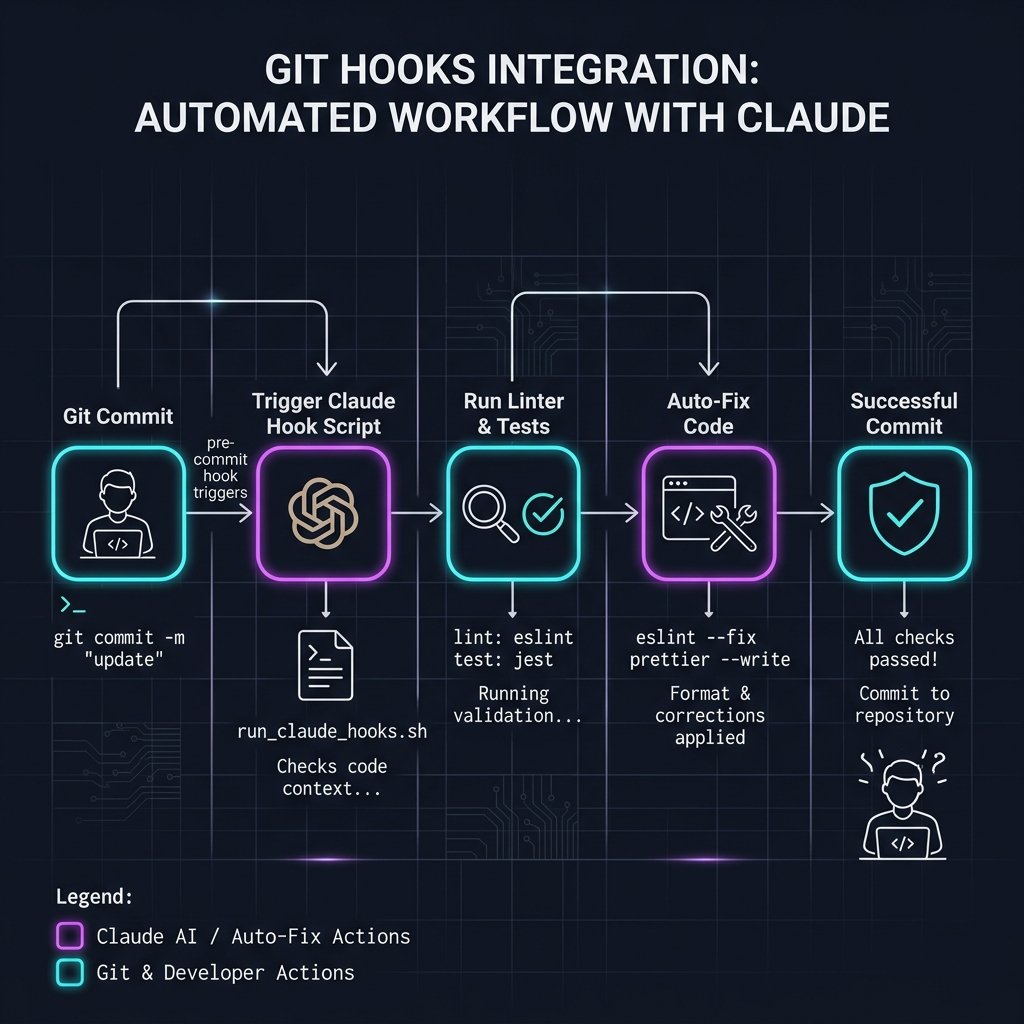
Unlike standard shell scripts, which can only run static commands, Claude Code Hooks run **dynamic, LLM-powered loops**. This means the hook doesn't just check if a linter failed; it reads the linter's output, understands the syntax error, modifies the code to fix it, runs the linter again, and only allows the git commit to proceed once the code is 100% compliant.
3. Configuring Hooks in Your Project
Claude Code Hooks are configured via a standardized JSON file located in the root of your repository: `hooks.json` or within a dedicated `.claude/` directory.
Here is a basic structure of a `.claude/hooks.json` configuration file:
{
  "version": "1.0.0",
  "hooks": {
    "pre-commit": {
      "enabled": true,
      "prompt": "Analyze the staged git diff, fix any obvious syntax or linter errors, and run npm run lint.",
      "allow_write": true
    }
  }
}
When you run `git commit`, the local git hook triggers Claude Code, which reads this configuration, runs the prompt on the staged files, and commits the auto-fixed changes.
In-Content Image Placement
4. 9 Essential Ways to Automate Your Workflow
Let's dive into the 9 most powerful ways to utilize Claude Code Hooks in your daily development cycle.
1. Pre-Commit Linter & Auto-Fixer
Instead of having your commit rejected by a strict pre-commit hook, use Claude to intercept the commit, analyze the staged diff, fix any ESLint or formatting issues, and automatically re-stage the clean files.
"pre-commit": {
  "prompt": "Read the staged files. Run 'npm run lint'. If there are errors, read the error output, fix the files, run lint again, and stage the changes."
}
2. Test-Driven Debugging on Save
Configure a file-watcher hook that triggers whenever a file changes. If the modified file is a test file or has associated tests, Claude will run the test suite. If a test fails, Claude will read the failure logs, modify the source code to fix the bug, and re-run the tests until they pass.
"on-save": {
  "prompt": "If a test fails in the modified module, read the test error, fix the source code, and run 'npm test' to verify."
}
3. Automated Git Commit Message Generator
Stop writing lazy commit messages like "fix bug" or "update styles". Use a `prepare-commit-msg` hook to analyze your staged diff and write a highly descriptive, conventional commit message (e.g., `feat(auth): implement biometric passkey login`).
"prepare-commit-msg": {
  "prompt": "Analyze the staged git diff and write a concise, professional conventional commit message following the project style."
}
4. Local Security & Secret Scanner
Prevent accidental leaks of API keys, database credentials, or private SSH keys. A pre-commit security hook directs Claude to scan all staged files for hardcoded secrets, automatically moving them to `.env` files and adding the secrets to `.gitignore`.
"pre-commit-security": {
  "prompt": "Scan staged files for secrets (API keys, passwords). Move any found secrets to .env and ensure .env is in .gitignore."
}
5. Automatic PR Description Writer
When you are ready to push your branch and open a Pull Request, trigger a pre-push hook that compiles all commits on your feature branch, compares your branch to `main`, and generates a detailed, Markdown-formatted PR description detailing changes, test plans, and impact.
"pre-push-pr": {
  "prompt": "Run 'git diff main...HEAD'. Write a detailed pull request description in markdown with a summary, changes, and test plan."
}
6. Database Schema & Migration Validator
When modifying database schemas (such as Prisma or SQL files), a hook can direct Claude to analyze the schema changes, verify that they do not introduce breaking changes (like dropping a column with active data), and generate the corresponding migration scripts.
"pre-migration": {
  "prompt": "Inspect modified database schemas. Verify there are no breaking changes. If safe, generate and run the migration script."
}
7. JSDoc & Inline Documentation Generator
Keep your codebase highly documented without writing tedious comments. A post-edit hook detects when a new function or class is created without documentation and automatically generates clean, accurate JSDoc or docstrings.
"post-edit-docs": {
  "prompt": "Scan modified files for undocumented functions or classes. Add clean, accurate JSDoc comments explaining parameters and returns."
}
8. Dependency Vulnerability Patcher
When you modify `package.json` or `requirements.txt`, trigger a hook that runs dependency audits (like `npm audit`). If vulnerabilities are found, Claude will analyze the impact, upgrade the vulnerable packages to safe versions, and run integration tests to ensure nothing broke.
"post-install-audit": {
  "prompt": "Run 'npm audit'. If high vulnerabilities are found, upgrade the packages to safe versions and verify with 'npm test'."
}
9. Automated Docker & CI/CD Config Validator
When modifying Dockerfiles, GitHub Actions, or Kubernetes manifests, a pre-commit hook directs Claude to validate the configuration files, check for syntax errors, and optimize the build stages for faster caching and smaller image sizes.
"pre-commit-ci": {
  "prompt": "Validate modified Dockerfiles or CI/CD configs. Optimize layers for caching and ensure no syntax or security issues exist."
}
5. Git & CI/CD Pipeline Integration
To make these hooks truly seamless, you can integrate them directly into your local Git configuration using tools like **Husky** or standard shell scripts inside your `.git/hooks/` folder.
For example, to set up a pre-commit hook using Husky, run:
npx husky add .husky/pre-commit "npx claude run-hook pre-commit"
Now, every time a developer runs `git commit`, Husky will invoke Claude Code, which will read the corresponding prompt from `.claude/hooks.json` and execute the autonomous loop locally before allowing the commit to finalize.
6. Best Practices for AI Hooks
While running autonomous AI loops on local events is incredibly powerful, it can also lead to high API costs or slow commit times if not configured correctly. Follow these best practices to ensure a smooth, cost-efficient setup:
-
Scope Your Prompts Carefully:
Do not give hooks overly broad instructions like "Refactor the entire project." Keep prompts highly specific and scoped only to the staged or modified files.
-
Set Token and Cost Limits:
Configure maximum token limits per hook execution in your `hooks.json` to prevent runaway agent loops from consuming excessive API credits.
-
Require Manual Confirmation for Destructive Actions:
For hooks that modify database schemas, run migrations, or delete files, always set `"require_approval": true` in the configuration to ensure a human developer reviews the plan before execution.
7. Conclusion: The Self-Healing Codebase
Claude Code Hooks represent a massive leap forward in developer productivity. By transitioning from manual chat interactions to automated, event-driven agent loops, you can build a **self-healing codebase** that automatically formats, tests, documents, and secures itself as you write code.
Start by implementing simple pre-commit linters and commit message generators, and gradually expand your automation suite as your team gains confidence in autonomous agents.
To optimize your local editor profiles for these automated workflows, check out our guide on VS Code Profiles Setup, or read our head-to-head review of Claude Code vs Cursor to see which tool dominates the 2026 landscape.

About the Author: Alex Rivera
Founder & Editor-in-Chief, The Byte 404
Alex is a former Senior Systems Architect at Netflix and Stripe with over 15 years of experience building high-throughput distributed APIs. He writes about distributed systems, backend performance, and AI-native engineering workflows.